

Submit abstract on behalf of someone else
Submit abstract
As an organiser, you can submit a new abstract on behalf of author at any time, even after the submission deadline.
Abstract requirements
The author(s) must provide you with all the information required as a mandatory field for abstract submission, e.g. preferred type of presentation, topic, first name, last name and institutes of all authors, e-mail addresses of presenters, etc.
1. Check if the author is already registered
Navigate to
> User
> User management
To submit an abstract on behalf of someone, that person must be registered with the role "Author".
Filter for the role "Authors" and enter the name or email address of the person you are looking for in the search box on the right. Click the Search button. 
Tip: You can view the full list of submitters by clicking Search directly, without entering a name or email. Here you can either:
a) use the browser search (shortcut: CTRL+F) to quickly find the person you are looking for
or
b) sort the list by surname by clicking on the column header and find people alphabetically.
a) The person is not yet registered
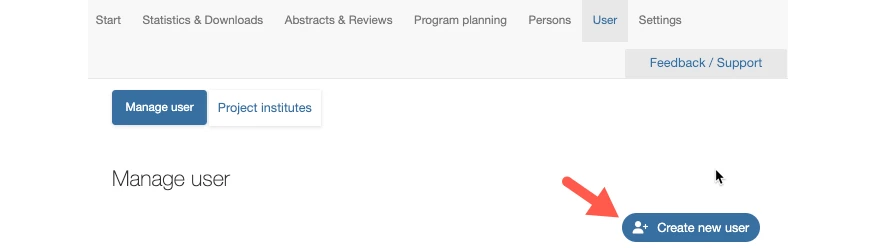
Create a new profile with the details of the person submitting the submission at:
> Users
> Click the "Create new user" button
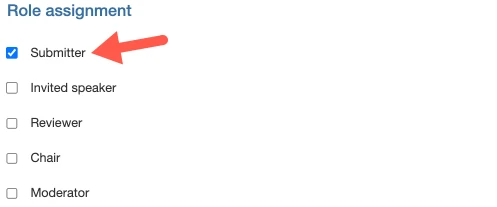
Assign the role "Submitter" to the person:
Save the entry with "Save and back" to return to the overview page.
b) The person is registered?
Proceed to the next step: Create and submit a new abstract.
2. Create and submit a new abstract
From the results list, select the person for whom you wish to submit an abstract. Click on the button in the right hand column under "Abstracts".

A new window with the abstract submission form will open. Fill in the required information step by step. Once you have entered your abstract, preview it to check that it is correctly formatted. If so, the abstract can be submitted.
Note: Upon submission, the submitter will automatically receive a confirmation email.
If you do not want emails to be sent, we can deactivate this globally for all submissions. Please contact us.